
Coaxial Cable#
A coaxial waveguide: an annular dielectric region (outer cylinder with inner cylinder removed). The cylinder walls (inner and outer conductors) are PEC, and the top and bottom annular faces are waveports.
We build the geometry with a boolean cut, use selectors to pick the two end faces, define entities for the dielectric volume and the two waveport surfaces, then generate the mesh, write the Palace config, run the simulation, and plot the S parameters.
import gmsh

from palacetoolkit.geometry import Selector
from palacetoolkit.mesh import (
    Entity,
    run_entity_pipeline,
    create_graded_mesh,
    generate_3d_mesh,
)
from palacetoolkit.simulation import (
    generate_palace_config_from_entities,
    run_palace,
)
from palacetoolkit.postpro import s_params
from palacetoolkit.viz import view_mesh
Geometry parameters#
A short coaxial cable segment. The inner conductor radius r_inner, outer conductor radius r_outer, and length length define the annular dielectric region.
r_inner = 0.5e-3   # inner conductor radius  [m]
r_outer = 1.5e-3   # outer conductor radius  [m]
length  = 20.0e-3  # coax length along z     [m]

# Frequency sweep
freq_min  = 0.1e9   # 0.1 GHz
freq_max  = 5.0e9   # 5 GHz
freq_step = 0.1e9   # 100 MHz steps
Build the annular geometry#
Create the outer cylinder and cut the inner cylinder from it to produce the annular dielectric region.
gmsh.initialize()
gmsh.option.setNumber("General.Terminal", 1)
gmsh.model.add("coax")

# Outer and inner cylinders
outer = gmsh.model.occ.addCylinder(0, 0, 0, 0, 0, length, r_outer)
inner = gmsh.model.occ.addCylinder(0, 0, 0, 0, 0, length, r_inner)

# Cut: outer minus inner → annular volume
annular, _ = gmsh.model.occ.cut([(3, outer)], [(3, inner)], removeObject=True, removeTool=True)
gmsh.model.occ.synchronize()

annular_tags = [t for d, t in annular if d == 3]
print(f"Annular volume tags: {annular_tags}")
Info    : [  0%] Difference
Info    : [ 10%] Difference
Info    : [ 20%] Difference
Info    : [ 30%] Difference
Info    : [ 40%] Difference
Info    : [ 50%] Difference
Info    : [ 60%] Difference
Info    : [ 70%] Difference - Filling splits of edges
Info    : [ 80%] Difference - Making faces
Info    : [ 90%] Difference - Classify solids
Annular volume tags: [1]
Select the two waveport faces#
Using the Selector API bound to the annular volume — pick the faces at z=0 and z=length. Each end face is an annulus (a ring-shaped surface).
# Bind the selector to the annular volume — only its boundary faces are considered.
# This mirrors build123d/cadquery where selectors operate on a specific shape.
sel = Selector((3, annular_tags[0]))

# cadquery-style: faces at a given coordinate
# The seam split may fragment the end faces into multiple pieces, so we
# collect all faces at each z and combine their tags.
port1_faces = sel.faces_at_z(0.0)
port2_faces = sel.faces_at_z(length)

assert len(port1_faces) >= 1, f"Expected faces at z=0, got {len(port1_faces)}"
assert len(port2_faces) >= 1, f"Expected faces at z=length, got {len(port2_faces)}"

port1_tags = [f.tag for f in port1_faces]
port2_tags = [f.tag for f in port2_faces]

print(f"Port 1 (z=0):      tags={port1_tags}")
print(f"Port 2 (z=length): tags={port2_tags}")
Port 1 (z=0):      tags=[7]
Port 2 (z=length): tags=[6]
Define entities#
The annular volume is a dielectric (vacuum, εᵣ=1). The two end faces are waveports. The remaining exterior surfaces (inner and outer cylinder walls) are PEC — they appear as dielectric__None in the physical group map and must be explicitly claimed.
entities = [
    Entity(
        name="dielectric",
        dim=3,
        btype="dielectric",
        mesh_order=0,
        tags=annular_tags,
        eps_r=1.0,
        mu_r=1.0,
        loss_tan=0.0,
    ),
    Entity(
        name="waveport_1",
        dim=2,
        btype="waveport",
        mesh_order=1,
        tags=port1_tags,
        mode=1,
        excitation=True,
    ),
    Entity(
        name="waveport_2",
        dim=2,
        btype="waveport",
        mesh_order=2,
        tags=port2_tags,
        mode=1,
        excitation=False,
    ),
    # PEC walls — the exterior surfaces of the dielectric (inner & outer conductors)
    Entity(
        name="dielectric__None",
        dim=2,
        btype="pec",
        mesh_order=3,
        tags=[],
    ),
]

pg_map = run_entity_pipeline(entities)
print("Physical group map:", pg_map)
  Physical group 'dielectric' (dim=3): pg=1, tags=[1]
  Physical group 'waveport_1' (dim=2): pg=2, tags=[7]
  Physical group 'waveport_2' (dim=2): pg=3, tags=[6]
  Physical group 'dielectric__None' (dim=2): pg=4, tags=[5, 4]
Physical group map: {'waveport_1': 2, 'waveport_2': 3, 'dielectric__None': 4, 'dielectric': 1}
Mesh generation#
mesh_file = "coax.msh"

# Operating wavelength at the highest frequency (5 GHz)
c = 3e8
wavelength = c / freq_max

# Graded mesh: refine near geometric curves
create_graded_mesh(
    wavelength=wavelength,
    ppw_near=6,
    ppw_far=3,
)

# OCC cylinders have a seam at theta=0 that produces duplicated facets.
# Override the background-mesh options to use boundary-extended sizing
# and Delaunay 3D (no reconstruction) to avoid the "overlapping facets" error.
gmsh.option.setNumber("Mesh.MeshSizeExtendFromBoundary", 1)
gmsh.option.setNumber("Mesh.MeshSizeFromPoints", 1)
gmsh.option.setNumber("Mesh.MeshSizeFromCurvature", 1)
gmsh.option.setNumber("Mesh.Algorithm3D", 7)

generate_3d_mesh(entities, output_file=mesh_file)
gmsh.finalize()
print(f"Mesh written to {mesh_file}")
  global: 6 curves, SizeMin=0.0100
  ppw_near=6  ppw_far=3
  SizeMax=0.0200  transition=0.0150
Mesh saved to coax.msh
  Nodes: 344
  Elements: 1798
Mesh written to coax.msh
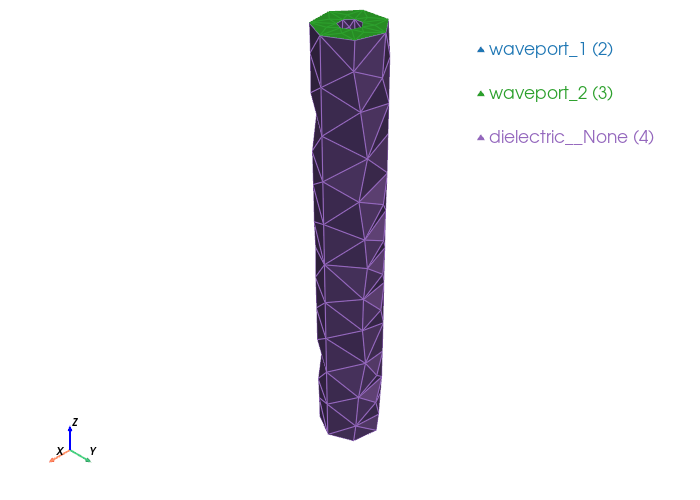
view_mesh(mesh_file)
Loading mesh file: coax.msh
Groups to render transparent: ['air_none', 'air_plastic_enclosure']

Mesh loaded successfully with 2 cell blocks
Found 514 triangles total
Physical group tags in mesh: {2: 'waveport_1', 3: 'waveport_2', 4: 'dielectric__None'}
Palace configuration & simulation#
Build the Palace JSON config from the entity definitions and run the driven simulation.
config_path = "coax.json"

config = generate_palace_config_from_entities(
    entity_defs=[e.to_dict() for e in entities],
    pg_map=pg_map,
    mesh_file=mesh_file,
    output_file=config_path,
    sim_type="driven",
    freq_min=freq_min,
    freq_max=freq_max,
    freq_step=freq_step,
    L0=1e-3,
    solver_order=2,
)

run_palace(config_path)
Palace config written to coax.json
Palace simulation output
  Running: /home/runner/.cache/palacetoolkit/runtime/palace-cpu-v0.17.0/bin/palace --serial /home/runner/work/PalaceToolkit/PalaceToolkit/docs/examples/coax.json
>> /home/runner/.cache/palacetoolkit/runtime/palace-cpu-v0.17.0/bin/palace-x86_64.bin /home/runner/work/PalaceToolkit/PalaceToolkit/docs/examples/coax.json

_____________     _______
_____   __   \____ __   /____ ____________
____   /_/  /  __ ` /  /  __ ` /  ___/  _ \
___   _____/  /_/  /  /  /_/  /  /__/  ___/
  /__/     \___,__/__/\___,__/\_____\_____/

Git changeset ID: v0.17.0-272-gb22f654ab
Running with 1 MPI process, 1 OpenMP thread
Device configuration: omp,cpu
Memory configuration: host-std
libCEED backend: /cpu/self/xsmm/blocked


Characteristic length and time scales:
 Lc = 2.000e-05 m, tc = 6.671e-05 ns
Finished partitioning mesh into 1 subdomain

Mesh curvature order: 1
Mesh bounding box:
 (Xmin, Ymin, Zmin) = (-1.499e-06, -1.495e-06, +0.000e+00) m
 (Xmax, Ymax, Zmax) = (+1.500e-06, +1.490e-06, +2.000e-05) m

Parallel Mesh Stats:

                minimum     average     maximum       total
 vertices           344         344         344         344
 edges             1833        1833        1833        1833
 faces             2721        2721        2721        2721
 elements          1232        1232        1232        1232
 neighbors            0           0           0

            minimum     maximum
 h        0.0175757   0.0789467
 kappa      1.10695     8.14122

Estimated current per-rank memory usage is: Min. 44.5M, Max. 44.5M, Avg. 44.5M, Total 44.5M
Estimated current per-node memory usage is: Min. 44.5M, Max. 44.5M, Avg. 44.5M, Total 44.5M

Configuring Robin impedance BC for wave ports at attributes:
 2: Index = 1, mode = 1, d = 0.000e+00 m,  n = (+0.0,+0.0,-1.0)
 3: Index = 2, mode = 1, d = 0.000e+00 m,  n = (+0.0,+0.0,+1.0)

Configuring wave port excitation source term at attributes:
 2: Index = 1

Configuring Dirichlet PEC BC at attributes:
 4

Computing adaptive fast frequency response for:
Excitation with index 1 has contributions from:
 Wave port  1

Beginning PROM construction offline phase:
 50 points for frequency sweep over [1.000e+08, 5.000e+09] GHz

Assembling system matrices, number of global unknowns:
 H1 (p = 2): 2177, ND (p = 2): 9108, RT (p = 2): 11859
 Operator assembly level: Partial
 Mesh geometries:
  Tetrahedron: P = 20, Q = 14 (quadrature order = 4)

Assembling multigrid hierarchy:
 Level 0 (p = 1): 1833 unknowns
 Level 1 (p = 2): 9108 unknowns
 Level 0 (auxiliary) (p = 1): 344 unknowns
 Level 1 (auxiliary) (p = 2): 2177 unknowns

  Residual norms for GMRES solve
  0 (restart 0) KSP residual norm 3.406299e-02
  1 (restart 0) KSP residual norm 5.377939e-03
  2 (restart 0) KSP residual norm 1.274932e-03
  3 (restart 0) KSP residual norm 2.870430e-04
  4 (restart 0) KSP residual norm 7.801330e-05
  5 (restart 0) KSP residual norm 2.280820e-05
  6 (restart 0) KSP residual norm 6.159115e-06
  7 (restart 0) KSP residual norm 1.977850e-06
  8 (restart 0) KSP residual norm 5.527554e-07
  9 (restart 0) KSP residual norm 1.614319e-07
 10 (restart 0) KSP residual norm 4.698356e-08
 11 (restart 0) KSP residual norm 1.429566e-08
 12 (restart 0) KSP residual norm 4.443530e-09
 13 (restart 0) KSP residual norm 1.374336e-09
 14 (restart 0) KSP residual norm 4.659458e-10
 15 (restart 0) KSP residual norm 1.555170e-10
GMRES solver converged in 15 iterations (avg. reduction factor: 2.779e-01)
 Field energy E (2.606e-20 J) + H (9.837e-25 J) = 2.606e-20 J

  Residual norms for GMRES solve
  0 (restart 0) KSP residual norm 6.478630e-04
  1 (restart 0) KSP residual norm 1.042888e-04
  2 (restart 0) KSP residual norm 2.434730e-05
  3 (restart 0) KSP residual norm 5.824633e-06
  4 (restart 0) KSP residual norm 1.642601e-06
  5 (restart 0) KSP residual norm 4.755256e-07
  6 (restart 0) KSP residual norm 1.316804e-07
  7 (restart 0) KSP residual norm 4.195899e-08
  8 (restart 0) KSP residual norm 1.104430e-08
  9 (restart 0) KSP residual norm 3.263025e-09
 10 (restart 0) KSP residual norm 9.942232e-10
 11 (restart 0) KSP residual norm 2.923259e-10
 12 (restart 0) KSP residual norm 9.072736e-11
 13 (restart 0) KSP residual norm 2.735052e-11
 14 (restart 0) KSP residual norm 8.869049e-12
 15 (restart 0) KSP residual norm 2.910715e-12
GMRES solver converged in 15 iterations (avg. reduction factor: 2.777e-01)
 Field energy E (1.016e-23 J) + H (1.571e-31 J) = 1.016e-23 J

  Residual norms for GMRES solve
  0 (restart 0) KSP residual norm 1.290992e-03
  1 (restart 0) KSP residual norm 2.077630e-04
  2 (restart 0) KSP residual norm 4.847816e-05
  3 (restart 0) KSP residual norm 1.160599e-05
  4 (restart 0) KSP residual norm 3.275103e-06
  5 (restart 0) KSP residual norm 9.477989e-07
  6 (restart 0) KSP residual norm 2.622982e-07
  7 (restart 0) KSP residual norm 8.353683e-08
  8 (restart 0) KSP residual norm 2.196345e-08
  9 (restart 0) KSP residual norm 6.489360e-09
 10 (restart 0) KSP residual norm 1.979508e-09
 11 (restart 0) KSP residual norm 5.817178e-10
 12 (restart 0) KSP residual norm 1.803578e-10
 13 (restart 0) KSP residual norm 5.430419e-11
 14 (restart 0) KSP residual norm 1.758803e-11
 15 (restart 0) KSP residual norm 5.759771e-12
GMRES solver converged in 15 iterations (avg. reduction factor: 2.775e-01)

Greedy iteration 1 (n = 4): ω* = 2.510e+09 GHz (1.052e+06), error = 6.605e-03, memory = 0/2
 Field energy E (4.034e-23 J) + H (2.481e-30 J) = 4.034e-23 J

  Residual norms for GMRES solve
  0 (restart 0) KSP residual norm 2.671341e-02
  1 (restart 0) KSP residual norm 4.251173e-03
  2 (restart 0) KSP residual norm 1.002649e-03
  3 (restart 0) KSP residual norm 2.291286e-04
  4 (restart 0) KSP residual norm 6.375541e-05
  5 (restart 0) KSP residual norm 1.882577e-05
  6 (restart 0) KSP residual norm 5.117623e-06
  7 (restart 0) KSP residual norm 1.632672e-06
  8 (restart 0) KSP residual norm 4.485293e-07
  9 (restart 0) KSP residual norm 1.306744e-07
 10 (restart 0) KSP residual norm 3.858773e-08
 11 (restart 0) KSP residual norm 1.177963e-08
 12 (restart 0) KSP residual norm 3.678122e-09
 13 (restart 0) KSP residual norm 1.118522e-09
 14 (restart 0) KSP residual norm 3.779439e-10
 15 (restart 0) KSP residual norm 1.266710e-10
GMRES solver converged in 15 iterations (avg. reduction factor: 2.787e-01)

Greedy iteration 2 (n = 6): ω* = 1.264e+08 GHz (5.296e+04), error = 6.449e-02, memory = 0/2
 Field energy E (1.626e-20 J) + H (3.872e-25 J) = 1.626e-20 J

  Residual norms for GMRES solve
  0 (restart 0) KSP residual norm 1.721379e-02
  1 (restart 0) KSP residual norm 2.816060e-03
  2 (restart 0) KSP residual norm 6.441959e-04
  3 (restart 0) KSP residual norm 1.526751e-04
  4 (restart 0) KSP residual norm 4.389650e-05
  5 (restart 0) KSP residual norm 1.313012e-05
  6 (restart 0) KSP residual norm 3.735006e-06
  7 (restart 0) KSP residual norm 1.031197e-06
  8 (restart 0) KSP residual norm 2.740638e-07
  9 (restart 0) KSP residual norm 8.084089e-08
 10 (restart 0) KSP residual norm 2.566439e-08
 11 (restart 0) KSP residual norm 9.093184e-09
 12 (restart 0) KSP residual norm 2.662435e-09
 13 (restart 0) KSP residual norm 7.635976e-10
 14 (restart 0) KSP residual norm 2.503081e-10
 15 (restart 0) KSP residual norm 7.606704e-11
GMRES solver converged in 15 iterations (avg. reduction factor: 2.773e-01)

Greedy iteration 3 (n = 8): ω* = 1.984e+08 GHz (8.318e+04), error = 8.235e-01, memory = 0/2
 Field energy E (6.604e-21 J) + H (6.214e-26 J) = 6.605e-21 J

  Residual norms for GMRES solve
  0 (restart 0) KSP residual norm 1.830254e-02
  1 (restart 0) KSP residual norm 2.887563e-03
  2 (restart 0) KSP residual norm 6.866167e-04
  3 (restart 0) KSP residual norm 1.544107e-04
  4 (restart 0) KSP residual norm 4.188013e-05
  5 (restart 0) KSP residual norm 1.222244e-05
  6 (restart 0) KSP residual norm 3.304293e-06
  7 (restart 0) KSP residual norm 1.061965e-06
  8 (restart 0) KSP residual norm 2.971345e-07
  9 (restart 0) KSP residual norm 8.679738e-08
 10 (restart 0) KSP residual norm 2.529531e-08
 11 (restart 0) KSP residual norm 7.677068e-09
 12 (restart 0) KSP residual norm 2.383289e-09
 13 (restart 0) KSP residual norm 7.397678e-10
 14 (restart 0) KSP residual norm 2.510230e-10
 15 (restart 0) KSP residual norm 8.369001e-11
GMRES solver converged in 15 iterations (avg. reduction factor: 2.780e-01)

Greedy iteration 4 (n = 10): ω* = 1.863e+08 GHz (7.810e+04), error = 3.005e-03, memory = 0/2
 Field energy E (7.513e-21 J) + H (8.194e-26 J) = 7.513e-21 J

  Residual norms for GMRES solve
  0 (restart 0) KSP residual norm 2.471952e-03
  1 (restart 0) KSP residual norm 3.992337e-04
  2 (restart 0) KSP residual norm 9.335507e-05
  3 (restart 0) KSP residual norm 2.229949e-05
  4 (restart 0) KSP residual norm 6.251688e-06
  5 (restart 0) KSP residual norm 1.811020e-06
  6 (restart 0) KSP residual norm 5.027887e-07
  7 (restart 0) KSP residual norm 1.604816e-07
  8 (restart 0) KSP residual norm 4.250006e-08
  9 (restart 0) KSP residual norm 1.256043e-08
 10 (restart 0) KSP residual norm 3.806320e-09
 11 (restart 0) KSP residual norm 1.119745e-09
 12 (restart 0) KSP residual norm 3.489876e-10
 13 (restart 0) KSP residual norm 1.057295e-10
 14 (restart 0) KSP residual norm 3.436626e-11
 15 (restart 0) KSP residual norm 1.137552e-11
GMRES solver converged in 15 iterations (avg. reduction factor: 2.781e-01)

Greedy iteration 5 (n = 12): ω* = 1.306e+09 GHz (5.475e+05), error = 9.908e-03, memory = 0/2
 Field energy E (1.484e-22 J) + H (3.354e-29 J) = 1.484e-22 J

  Residual norms for GMRES solve
  0 (restart 0) KSP residual norm 1.975372e-03
  1 (restart 0) KSP residual norm 3.179196e-04
  2 (restart 0) KSP residual norm 7.416414e-05
  3 (restart 0) KSP residual norm 1.776143e-05
  4 (restart 0) KSP residual norm 5.011252e-06
  5 (restart 0) KSP residual norm 1.450116e-06
  6 (restart 0) KSP residual norm 4.012530e-07
  7 (restart 0) KSP residual norm 1.277819e-07
  8 (restart 0) KSP residual norm 3.359011e-08
  9 (restart 0) KSP residual norm 9.925442e-09
 10 (restart 0) KSP residual norm 3.028022e-09
 11 (restart 0) KSP residual norm 8.896084e-10
 12 (restart 0) KSP residual norm 2.757764e-10
 13 (restart 0) KSP residual norm 8.302209e-11
 14 (restart 0) KSP residual norm 2.687819e-11
 15 (restart 0) KSP residual norm 8.799924e-12
GMRES solver converged in 15 iterations (avg. reduction factor: 2.775e-01)

Greedy iteration 6 (n = 14): ω* = 1.640e+09 GHz (6.875e+05), error = 6.706e-04, memory = 1/2
 Field energy E (9.447e-23 J) + H (1.361e-29 J) = 9.447e-23 J

  Residual norms for GMRES solve
  0 (restart 0) KSP residual norm 2.620130e-03
  1 (restart 0) KSP residual norm 4.205427e-04
  2 (restart 0) KSP residual norm 9.878819e-05
  3 (restart 0) KSP residual norm 2.301971e-05
  4 (restart 0) KSP residual norm 6.534413e-06
  5 (restart 0) KSP residual norm 1.913502e-06
  6 (restart 0) KSP residual norm 5.280371e-07
  7 (restart 0) KSP residual norm 1.683610e-07
  8 (restart 0) KSP residual norm 4.515772e-08
  9 (restart 0) KSP residual norm 1.318776e-08
 10 (restart 0) KSP residual norm 3.965331e-09
 11 (restart 0) KSP residual norm 1.198271e-09
 12 (restart 0) KSP residual norm 3.736484e-10
 13 (restart 0) KSP residual norm 1.127910e-10
 14 (restart 0) KSP residual norm 3.786099e-11
 15 (restart 0) KSP residual norm 1.264250e-11
GMRES solver converged in 15 iterations (avg. reduction factor: 2.790e-01)

Greedy iteration 7 (n = 16): ω* = 1.266e+09 GHz (5.309e+05), error = 1.055e-02, memory = 0/2
 Field energy E (1.601e-22 J) + H (3.815e-29 J) = 1.601e-22 J

  Residual norms for GMRES solve
  0 (restart 0) KSP residual norm 2.487192e-02
  1 (restart 0) KSP residual norm 3.927711e-03
  2 (restart 0) KSP residual norm 9.312718e-04
  3 (restart 0) KSP residual norm 2.096378e-04
  4 (restart 0) KSP residual norm 5.695627e-05
  5 (restart 0) KSP residual norm 1.664760e-05
  6 (restart 0) KSP residual norm 4.495773e-06
  7 (restart 0) KSP residual norm 1.443935e-06
  8 (restart 0) KSP residual norm 4.035537e-07
  9 (restart 0) KSP residual norm 1.178668e-07
 10 (restart 0) KSP residual norm 3.431021e-08
 11 (restart 0) KSP residual norm 1.043535e-08
 12 (restart 0) KSP residual norm 3.243342e-09
 13 (restart 0) KSP residual norm 1.003452e-09
 14 (restart 0) KSP residual norm 3.402405e-10
 15 (restart 0) KSP residual norm 1.135404e-10
GMRES solver converged in 15 iterations (avg. reduction factor: 2.779e-01)

Greedy iteration 8 (n = 18): ω* = 1.370e+08 GHz (5.741e+04), error = 5.425e-05, memory = 1/2
 Field energy E (1.390e-20 J) + H (2.797e-25 J) = 1.390e-20 J

  Residual norms for GMRES solve
  0 (restart 0) KSP residual norm 4.238600e-03
  1 (restart 0) KSP residual norm 6.797653e-04
  2 (restart 0) KSP residual norm 1.596491e-04
  3 (restart 0) KSP residual norm 3.725164e-05
  4 (restart 0) KSP residual norm 1.056824e-05
  5 (restart 0) KSP residual norm 3.084273e-06
  6 (restart 0) KSP residual norm 8.501745e-07
  7 (restart 0) KSP residual norm 2.715595e-07
  8 (restart 0) KSP residual norm 7.283379e-08
  9 (restart 0) KSP residual norm 2.125511e-08
 10 (restart 0) KSP residual norm 6.393811e-09
 11 (restart 0) KSP residual norm 1.923987e-09
 12 (restart 0) KSP residual norm 6.002810e-10
 13 (restart 0) KSP residual norm 1.811688e-10
 14 (restart 0) KSP residual norm 6.063609e-11
 15 (restart 0) KSP residual norm 2.018100e-11
GMRES solver converged in 15 iterations (avg. reduction factor: 2.787e-01)

Greedy iteration 9 (n = 20): ω* = 7.831e+08 GHz (3.283e+05), error = 2.838e-04, memory = 2/2
 Field energy E (4.189e-22 J) + H (2.615e-28 J) = 4.189e-22 J

Adaptive sampling converged with 11 frequency samples:
 n = 22, error = 2.838e-04, tol = 1.000e-03, memory = 2/2
 Sampled frequencies (GHz): 1.000e+08, 5.000e+09, 2.510e+09, 1.264e+08,
                            1.984e+08, 1.863e+08, 1.306e+09, 1.640e+09,
                            1.266e+09, 1.370e+08, 7.831e+08
 Sample errors: inf, inf, 6.605e-03, 6.449e-02, 8.235e-01,
                3.005e-03, 9.908e-03, 6.706e-04, 1.055e-02, 5.425e-05,
                2.838e-04
 Total offline phase elapsed time: 1.55e+01 s

Beginning fast frequency sweep online phase

It 1/50: ω/2π = 1.000e+08 GHz (total elapsed time = 1.55e+01 s)

 Sol. ||E|| = 4.654744e-02
 Field energy E (2.606e-20 J) + H (9.837e-25 J) = 2.606e-20 J
 S[1][1] = -9.999e-01-1.638e-02i, |S[1][1]| = -6.176e-05, arg(S[1][1]) = -1.791e+02
 S[2][1] = +1.391e-25-1.402e-23i, |S[2][1]| = -4.571e+02, arg(S[2][1]) = -8.943e+01

 Wrote fields to disk (Paraview) at step 1

It 2/50: ω/2π = 2.000e+08 GHz (total elapsed time = 1.60e+01 s)

 Sol. ||E|| = 2.346543e-02
 Field energy E (6.502e-21 J) + H (6.023e-26 J) = 6.502e-21 J
 S[1][1] = -1.000e+00-8.170e-03i, |S[1][1]| = -1.800e-05, arg(S[1][1]) = -1.795e+02
 S[2][1] = -4.870e-26+5.596e-25i, |S[2][1]| = -4.850e+02, arg(S[2][1]) = +9.497e+01

It 3/50: ω/2π = 3.000e+08 GHz (total elapsed time = 1.60e+01 s)

 Sol. ||E|| = 1.541145e-02
 Field energy E (2.886e-21 J) + H (1.218e-26 J) = 2.886e-21 J
 S[1][1] = -1.000e+00-5.439e-03i, |S[1][1]| = -6.957e-06, arg(S[1][1]) = -1.797e+02
 S[2][1] = -1.388e-24-6.802e-24i, |S[2][1]| = -4.632e+02, arg(S[2][1]) = -1.015e+02

It 4/50: ω/2π = 4.000e+08 GHz (total elapsed time = 1.60e+01 s)

 Sol. ||E|| = 1.112210e-02
 Field energy E (1.588e-21 J) + H (3.821e-27 J) = 1.588e-21 J
 S[1][1] = -1.000e+00-3.991e-03i, |S[1][1]| = -4.537e-06, arg(S[1][1]) = -1.798e+02
 S[2][1] = -9.362e-25-5.729e-24i, |S[2][1]| = -4.647e+02, arg(S[2][1]) = -9.928e+01

It 5/50: ω/2π = 5.000e+08 GHz (total elapsed time = 1.61e+01 s)

 Sol. ||E|| = 8.833513e-03
 Field energy E (1.011e-21 J) + H (1.555e-27 J) = 1.011e-21 J
 S[1][1] = -1.000e+00-3.175e-03i, |S[1][1]| = -2.986e-06, arg(S[1][1]) = -1.798e+02
 S[2][1] = +5.724e-25-4.440e-24i, |S[2][1]| = -4.670e+02, arg(S[2][1]) = -8.265e+01

It 6/50: ω/2π = 6.000e+08 GHz (total elapsed time = 1.61e+01 s)

 Sol. ||E|| = 7.420586e-03
 Field energy E (7.065e-22 J) + H (7.564e-28 J) = 7.065e-22 J
 S[1][1] = -1.000e+00-2.664e-03i, |S[1][1]| = -2.003e-06, arg(S[1][1]) = -1.798e+02
 S[2][1] = -9.126e-25-3.806e-24i, |S[2][1]| = -4.681e+02, arg(S[2][1]) = -1.035e+02

 Wrote fields to disk (Paraview) at step 6

It 7/50: ω/2π = 7.000e+08 GHz (total elapsed time = 1.65e+01 s)

 Sol. ||E|| = 6.329674e-03
 Field energy E (5.167e-22 J) + H (4.055e-28 J) = 5.167e-22 J
 S[1][1] = -1.000e+00-2.273e-03i, |S[1][1]| = -1.512e-06, arg(S[1][1]) = -1.799e+02
 S[2][1] = +9.629e-25-3.148e-24i, |S[2][1]| = -4.696e+02, arg(S[2][1]) = -7.300e+01

It 8/50: ω/2π = 8.000e+08 GHz (total elapsed time = 1.66e+01 s)

 Sol. ||E|| = 5.453841e-03
 Field energy E (3.986e-22 J) + H (2.447e-28 J) = 3.986e-22 J
 S[1][1] = -1.000e+00-2.004e-03i, |S[1][1]| = -1.251e-06, arg(S[1][1]) = -1.799e+02
 S[2][1] = -3.570e-27-1.625e-24i, |S[2][1]| = -4.758e+02, arg(S[2][1]) = -9.013e+01

It 9/50: ω/2π = 9.000e+08 GHz (total elapsed time = 1.66e+01 s)

 Sol. ||E|| = 4.355761e-03
 Field energy E (2.901e-22 J) + H (1.801e-28 J) = 2.901e-22 J
 S[1][1] = -1.000e+00-1.640e-03i, |S[1][1]| = -1.260e-06, arg(S[1][1]) = -1.799e+02
 S[2][1] = +3.183e-25-3.842e-25i, |S[2][1]| = -4.860e+02, arg(S[2][1]) = -5.036e+01

It 10/50: ω/2π = 1.000e+09 GHz (total elapsed time = 1.66e+01 s)

 Sol. ||E|| = 4.350624e-03
 Field energy E (2.552e-22 J) + H (1.005e-28 J) = 2.552e-22 J
 S[1][1] = -1.000e+00-1.604e-03i, |S[1][1]| = -8.053e-07, arg(S[1][1]) = -1.799e+02
 S[2][1] = -1.267e-27-1.461e-24i, |S[2][1]| = -4.767e+02, arg(S[2][1]) = -9.005e+01

It 11/50: ω/2π = 1.100e+09 GHz (total elapsed time = 1.66e+01 s)

 Sol. ||E|| = 3.256232e-03
 Field energy E (1.592e-22 J) + H (1.129e-28 J) = 1.592e-22 J
 S[1][1] = -1.000e+00-1.101e-03i, |S[1][1]| = -6.997e-07, arg(S[1][1]) = -1.799e+02
 S[2][1] = -6.661e-28-1.346e-24i, |S[2][1]| = -4.774e+02, arg(S[2][1]) = -9.003e+01

 Wrote fields to disk (Paraview) at step 11

It 12/50: ω/2π = 1.200e+09 GHz (total elapsed time = 1.71e+01 s)

 Sol. ||E|| = 3.788782e-03
 Field energy E (1.785e-22 J) + H (4.734e-29 J) = 1.785e-22 J
 S[1][1] = -1.000e+00-1.346e-03i, |S[1][1]| = -4.591e-07, arg(S[1][1]) = -1.799e+02
 S[2][1] = -8.924e-27-2.138e-24i, |S[2][1]| = -4.734e+02, arg(S[2][1]) = -9.024e+01

It 13/50: ω/2π = 1.300e+09 GHz (total elapsed time = 1.71e+01 s)

 Sol. ||E|| = 3.381591e-03
 Field energy E (1.502e-22 J) + H (3.433e-29 J) = 1.502e-22 J
 S[1][1] = -1.000e+00-1.227e-03i, |S[1][1]| = -4.601e-07, arg(S[1][1]) = -1.799e+02
 S[2][1] = +2.936e-28-1.824e-24i, |S[2][1]| = -4.748e+02, arg(S[2][1]) = -8.999e+01

It 14/50: ω/2π = 1.400e+09 GHz (total elapsed time = 1.71e+01 s)

 Sol. ||E|| = 3.131479e-03
 Field energy E (1.296e-22 J) + H (2.561e-29 J) = 1.296e-22 J
 S[1][1] = -1.000e+00-1.140e-03i, |S[1][1]| = -4.016e-07, arg(S[1][1]) = -1.799e+02
 S[2][1] = +2.496e-28-1.631e-24i, |S[2][1]| = -4.757e+02, arg(S[2][1]) = -8.999e+01

It 15/50: ω/2π = 1.500e+09 GHz (total elapsed time = 1.71e+01 s)

 Sol. ||E|| = 2.920028e-03
 Field energy E (1.129e-22 J) + H (1.944e-29 J) = 1.129e-22 J
 S[1][1] = -1.000e+00-1.064e-03i, |S[1][1]| = -3.511e-07, arg(S[1][1]) = -1.799e+02
 S[2][1] = +2.234e-28-1.522e-24i, |S[2][1]| = -4.763e+02, arg(S[2][1]) = -8.999e+01

It 16/50: ω/2π = 1.600e+09 GHz (total elapsed time = 1.72e+01 s)

 Sol. ||E|| = 2.742855e-03
 Field energy E (9.920e-23 J) + H (1.499e-29 J) = 9.920e-23 J
 S[1][1] = -1.000e+00-9.973e-04i, |S[1][1]| = -3.060e-07, arg(S[1][1]) = -1.799e+02
 S[2][1] = +2.036e-28-1.454e-24i, |S[2][1]| = -4.768e+02, arg(S[2][1]) = -8.999e+01

 Wrote fields to disk (Paraview) at step 16

It 17/50: ω/2π = 1.700e+09 GHz (total elapsed time = 1.76e+01 s)

 Sol. ||E|| = 2.584214e-03
 Field energy E (8.783e-23 J) + H (1.175e-29 J) = 8.783e-23 J
 S[1][1] = -1.000e+00-9.382e-04i, |S[1][1]| = -2.695e-07, arg(S[1][1]) = -1.799e+02
 S[2][1] = +1.762e-28-1.385e-24i, |S[2][1]| = -4.772e+02, arg(S[2][1]) = -8.999e+01

It 18/50: ω/2π = 1.800e+09 GHz (total elapsed time = 1.76e+01 s)

 Sol. ||E|| = 2.439863e-03
 Field energy E (7.830e-23 J) + H (9.335e-30 J) = 7.830e-23 J
 S[1][1] = -1.000e+00-8.856e-04i, |S[1][1]| = -2.411e-07, arg(S[1][1]) = -1.799e+02
 S[2][1] = +1.324e-28-1.295e-24i, |S[2][1]| = -4.778e+02, arg(S[2][1]) = -8.999e+01

It 19/50: ω/2π = 1.900e+09 GHz (total elapsed time = 1.77e+01 s)

 Sol. ||E|| = 2.311401e-03
 Field energy E (7.036e-23 J) + H (7.540e-30 J) = 7.036e-23 J
 S[1][1] = -1.000e+00-8.399e-04i, |S[1][1]| = -2.163e-07, arg(S[1][1]) = -1.800e+02
 S[2][1] = +1.428e-28-1.224e-24i, |S[2][1]| = -4.782e+02, arg(S[2][1]) = -8.999e+01

It 20/50: ω/2π = 2.000e+09 GHz (total elapsed time = 1.77e+01 s)

 Sol. ||E|| = 2.191439e-03
 Field energy E (6.354e-23 J) + H (6.156e-30 J) = 6.354e-23 J
 S[1][1] = -1.000e+00-7.984e-04i, |S[1][1]| = -1.969e-07, arg(S[1][1]) = -1.800e+02
 S[2][1] = +1.321e-28-1.146e-24i, |S[2][1]| = -4.788e+02, arg(S[2][1]) = -8.999e+01

It 21/50: ω/2π = 2.100e+09 GHz (total elapsed time = 1.77e+01 s)

 Sol. ||E|| = 2.088096e-03
 Field energy E (5.766e-23 J) + H (5.072e-30 J) = 5.766e-23 J
 S[1][1] = -1.000e+00-7.608e-04i, |S[1][1]| = -1.781e-07, arg(S[1][1]) = -1.800e+02
 S[2][1] = +1.165e-28-1.090e-24i, |S[2][1]| = -4.793e+02, arg(S[2][1]) = -8.999e+01

 Wrote fields to disk (Paraview) at step 21

It 22/50: ω/2π = 2.200e+09 GHz (total elapsed time = 1.82e+01 s)

 Sol. ||E|| = 1.989842e-03
 Field energy E (5.254e-23 J) + H (4.214e-30 J) = 5.254e-23 J
 S[1][1] = -1.000e+00-7.262e-04i, |S[1][1]| = -1.634e-07, arg(S[1][1]) = -1.800e+02
 S[2][1] = +9.972e-29-1.032e-24i, |S[2][1]| = -4.797e+02, arg(S[2][1]) = -8.999e+01

It 23/50: ω/2π = 2.300e+09 GHz (total elapsed time = 1.82e+01 s)

 Sol. ||E|| = 1.905499e-03
 Field energy E (4.809e-23 J) + H (3.530e-30 J) = 4.809e-23 J
 S[1][1] = -1.000e+00-6.950e-04i, |S[1][1]| = -1.488e-07, arg(S[1][1]) = -1.800e+02
 S[2][1] = +9.472e-29-9.878e-25i, |S[2][1]| = -4.801e+02, arg(S[2][1]) = -8.999e+01

It 24/50: ω/2π = 2.400e+09 GHz (total elapsed time = 1.82e+01 s)

 Sol. ||E|| = 1.828506e-03
 Field energy E (4.407e-23 J) + H (2.958e-30 J) = 4.407e-23 J
 S[1][1] = -1.000e+00-6.645e-04i, |S[1][1]| = -1.360e-07, arg(S[1][1]) = -1.800e+02
 S[2][1] = +8.982e-29-9.740e-25i, |S[2][1]| = -4.802e+02, arg(S[2][1]) = -8.999e+01

It 25/50: ω/2π = 2.500e+09 GHz (total elapsed time = 1.82e+01 s)

 Sol. ||E|| = 1.754186e-03
 Field energy E (4.067e-23 J) + H (2.521e-30 J) = 4.067e-23 J
 S[1][1] = -1.000e+00-6.388e-04i, |S[1][1]| = -1.257e-07, arg(S[1][1]) = -1.800e+02
 S[2][1] = +8.734e-29-9.179e-25i, |S[2][1]| = -4.807e+02, arg(S[2][1]) = -8.999e+01

It 26/50: ω/2π = 2.600e+09 GHz (total elapsed time = 1.82e+01 s)

 Sol. ||E|| = 1.689657e-03
 Field energy E (3.753e-23 J) + H (2.145e-30 J) = 3.753e-23 J
 S[1][1] = -1.000e+00-6.131e-04i, |S[1][1]| = -1.152e-07, arg(S[1][1]) = -1.800e+02
 S[2][1] = +8.417e-29-9.132e-25i, |S[2][1]| = -4.808e+02, arg(S[2][1]) = -8.999e+01

 Wrote fields to disk (Paraview) at step 26

It 27/50: ω/2π = 2.700e+09 GHz (total elapsed time = 1.87e+01 s)

 Sol. ||E|| = 1.626794e-03
 Field energy E (3.482e-23 J) + H (1.846e-30 J) = 3.482e-23 J
 S[1][1] = -1.000e+00-5.907e-04i, |S[1][1]| = -1.070e-07, arg(S[1][1]) = -1.800e+02
 S[2][1] = +7.250e-29-8.687e-25i, |S[2][1]| = -4.812e+02, arg(S[2][1]) = -9.000e+01

It 28/50: ω/2π = 2.800e+09 GHz (total elapsed time = 1.87e+01 s)

 Sol. ||E|| = 1.564864e-03
 Field energy E (3.243e-23 J) + H (1.604e-30 J) = 3.243e-23 J
 S[1][1] = -1.000e+00-5.705e-04i, |S[1][1]| = -1.006e-07, arg(S[1][1]) = -1.800e+02
 S[2][1] = +6.364e-29-8.120e-25i, |S[2][1]| = -4.818e+02, arg(S[2][1]) = -9.000e+01

It 29/50: ω/2π = 2.900e+09 GHz (total elapsed time = 1.87e+01 s)

 Sol. ||E|| = 1.511862e-03
 Field energy E (3.020e-23 J) + H (1.391e-30 J) = 3.020e-23 J
 S[1][1] = -1.000e+00-5.504e-04i, |S[1][1]| = -9.348e-08, arg(S[1][1]) = -1.800e+02
 S[2][1] = +6.273e-29-7.979e-25i, |S[2][1]| = -4.820e+02, arg(S[2][1]) = -9.000e+01

It 30/50: ω/2π = 3.000e+09 GHz (total elapsed time = 1.88e+01 s)

 Sol. ||E|| = 1.461627e-03
 Field energy E (2.825e-23 J) + H (1.217e-30 J) = 2.825e-23 J
 S[1][1] = -1.000e+00-5.325e-04i, |S[1][1]| = -8.746e-08, arg(S[1][1]) = -1.800e+02
 S[2][1] = +4.935e-29-7.482e-25i, |S[2][1]| = -4.825e+02, arg(S[2][1]) = -9.000e+01

It 31/50: ω/2π = 3.100e+09 GHz (total elapsed time = 1.88e+01 s)

 Sol. ||E|| = 1.409532e-03
 Field energy E (2.648e-23 J) + H (1.072e-30 J) = 2.648e-23 J
 S[1][1] = -1.000e+00-5.157e-04i, |S[1][1]| = -8.287e-08, arg(S[1][1]) = -1.800e+02
 S[2][1] = +4.987e-29-7.134e-25i, |S[2][1]| = -4.829e+02, arg(S[2][1]) = -9.000e+01

 Wrote fields to disk (Paraview) at step 31

It 32/50: ω/2π = 3.200e+09 GHz (total elapsed time = 1.92e+01 s)

 Sol. ||E|| = 1.369429e-03
 Field energy E (2.481e-23 J) + H (9.385e-31 J) = 2.481e-23 J
 S[1][1] = -1.000e+00-4.988e-04i, |S[1][1]| = -7.699e-08, arg(S[1][1]) = -1.800e+02
 S[2][1] = +4.098e-29-7.144e-25i, |S[2][1]| = -4.829e+02, arg(S[2][1]) = -9.000e+01

It 33/50: ω/2π = 3.300e+09 GHz (total elapsed time = 1.93e+01 s)

 Sol. ||E|| = 1.327916e-03
 Field energy E (2.337e-23 J) + H (8.335e-31 J) = 2.337e-23 J
 S[1][1] = -1.000e+00-4.845e-04i, |S[1][1]| = -7.226e-08, arg(S[1][1]) = -1.800e+02
 S[2][1] = +4.710e-29-6.847e-25i, |S[2][1]| = -4.833e+02, arg(S[2][1]) = -9.000e+01

It 34/50: ω/2π = 3.400e+09 GHz (total elapsed time = 1.93e+01 s)

 Sol. ||E|| = 1.292335e-03
 Field energy E (2.199e-23 J) + H (7.368e-31 J) = 2.199e-23 J
 S[1][1] = -1.000e+00-4.698e-04i, |S[1][1]| = -6.737e-08, arg(S[1][1]) = -1.800e+02
 S[2][1] = +4.494e-29-6.814e-25i, |S[2][1]| = -4.833e+02, arg(S[2][1]) = -9.000e+01

It 35/50: ω/2π = 3.500e+09 GHz (total elapsed time = 1.93e+01 s)

 Sol. ||E|| = 1.251097e-03
 Field energy E (2.076e-23 J) + H (6.574e-31 J) = 2.076e-23 J
 S[1][1] = -1.000e+00-4.564e-04i, |S[1][1]| = -6.453e-08, arg(S[1][1]) = -1.800e+02
 S[2][1] = +4.057e-29-6.458e-25i, |S[2][1]| = -4.838e+02, arg(S[2][1]) = -9.000e+01

It 36/50: ω/2π = 3.600e+09 GHz (total elapsed time = 1.93e+01 s)

 Sol. ||E|| = 1.217558e-03
 Field energy E (1.961e-23 J) + H (5.861e-31 J) = 1.961e-23 J
 S[1][1] = -1.000e+00-4.435e-04i, |S[1][1]| = -6.077e-08, arg(S[1][1]) = -1.800e+02
 S[2][1] = +3.577e-29-6.287e-25i, |S[2][1]| = -4.840e+02, arg(S[2][1]) = -9.000e+01

 Wrote fields to disk (Paraview) at step 36

It 37/50: ω/2π = 3.700e+09 GHz (total elapsed time = 1.98e+01 s)

 Sol. ||E|| = 1.188644e-03
 Field energy E (1.851e-23 J) + H (5.214e-31 J) = 1.851e-23 J
 S[1][1] = -1.000e+00-4.302e-04i, |S[1][1]| = -5.664e-08, arg(S[1][1]) = -1.800e+02
 S[2][1] = +3.972e-29-6.482e-25i, |S[2][1]| = -4.838e+02, arg(S[2][1]) = -9.000e+01

It 38/50: ω/2π = 3.800e+09 GHz (total elapsed time = 1.98e+01 s)

 Sol. ||E|| = 1.153693e-03
 Field energy E (1.761e-23 J) + H (4.730e-31 J) = 1.761e-23 J
 S[1][1] = -1.000e+00-4.205e-04i, |S[1][1]| = -5.445e-08, arg(S[1][1]) = -1.800e+02
 S[2][1] = +3.302e-29-5.984e-25i, |S[2][1]| = -4.845e+02, arg(S[2][1]) = -9.000e+01

It 39/50: ω/2π = 3.900e+09 GHz (total elapsed time = 1.98e+01 s)

 Sol. ||E|| = 1.124691e-03
 Field energy E (1.672e-23 J) + H (4.261e-31 J) = 1.672e-23 J
 S[1][1] = -1.000e+00-4.096e-04i, |S[1][1]| = -5.167e-08, arg(S[1][1]) = -1.800e+02
 S[2][1] = +3.216e-29-5.827e-25i, |S[2][1]| = -4.847e+02, arg(S[2][1]) = -9.000e+01

It 40/50: ω/2π = 4.000e+09 GHz (total elapsed time = 1.98e+01 s)

 Sol. ||E|| = 1.097573e-03
 Field energy E (1.587e-23 J) + H (3.837e-31 J) = 1.587e-23 J
 S[1][1] = -1.000e+00-3.989e-04i, |S[1][1]| = -4.891e-08, arg(S[1][1]) = -1.800e+02
 S[2][1] = +3.241e-29-5.786e-25i, |S[2][1]| = -4.848e+02, arg(S[2][1]) = -9.000e+01

It 41/50: ω/2π = 4.100e+09 GHz (total elapsed time = 1.99e+01 s)

 Sol. ||E|| = 1.069225e-03
 Field energy E (1.512e-23 J) + H (3.488e-31 J) = 1.512e-23 J
 S[1][1] = -1.000e+00-3.896e-04i, |S[1][1]| = -4.683e-08, arg(S[1][1]) = -1.800e+02
 S[2][1] = +2.895e-29-5.520e-25i, |S[2][1]| = -4.852e+02, arg(S[2][1]) = -9.000e+01

 Wrote fields to disk (Paraview) at step 41

It 42/50: ω/2π = 4.200e+09 GHz (total elapsed time = 2.03e+01 s)

 Sol. ||E|| = 1.042445e-03
 Field energy E (1.441e-23 J) + H (3.171e-31 J) = 1.441e-23 J
 S[1][1] = -1.000e+00-3.804e-04i, |S[1][1]| = -4.483e-08, arg(S[1][1]) = -1.800e+02
 S[2][1] = +2.905e-29-5.393e-25i, |S[2][1]| = -4.854e+02, arg(S[2][1]) = -9.000e+01

It 43/50: ω/2π = 4.300e+09 GHz (total elapsed time = 2.03e+01 s)

 Sol. ||E|| = 1.018555e-03
 Field energy E (1.375e-23 J) + H (2.886e-31 J) = 1.375e-23 J
 S[1][1] = -1.000e+00-3.715e-04i, |S[1][1]| = -4.270e-08, arg(S[1][1]) = -1.800e+02
 S[2][1] = +2.827e-29-5.294e-25i, |S[2][1]| = -4.855e+02, arg(S[2][1]) = -9.000e+01

It 44/50: ω/2π = 4.400e+09 GHz (total elapsed time = 2.04e+01 s)

 Sol. ||E|| = 9.976916e-04
 Field energy E (1.312e-23 J) + H (2.621e-31 J) = 1.312e-23 J
 S[1][1] = -1.000e+00-3.626e-04i, |S[1][1]| = -4.040e-08, arg(S[1][1]) = -1.800e+02
 S[2][1] = +2.632e-29-5.283e-25i, |S[2][1]| = -4.855e+02, arg(S[2][1]) = -9.000e+01

It 45/50: ω/2π = 4.500e+09 GHz (total elapsed time = 2.04e+01 s)

 Sol. ||E|| = 9.767536e-04
 Field energy E (1.253e-23 J) + H (2.391e-31 J) = 1.253e-23 J
 S[1][1] = -1.000e+00-3.543e-04i, |S[1][1]| = -3.838e-08, arg(S[1][1]) = -1.800e+02
 S[2][1] = +2.384e-29-5.244e-25i, |S[2][1]| = -4.856e+02, arg(S[2][1]) = -9.000e+01

It 46/50: ω/2π = 4.600e+09 GHz (total elapsed time = 2.04e+01 s)

 Sol. ||E|| = 9.528465e-04
 Field energy E (1.201e-23 J) + H (2.197e-31 J) = 1.201e-23 J
 S[1][1] = -1.000e+00-3.470e-04i, |S[1][1]| = -3.723e-08, arg(S[1][1]) = -1.800e+02
 S[2][1] = +2.499e-29-4.988e-25i, |S[2][1]| = -4.860e+02, arg(S[2][1]) = -9.000e+01

 Wrote fields to disk (Paraview) at step 46

It 47/50: ω/2π = 4.700e+09 GHz (total elapsed time = 2.09e+01 s)

 Sol. ||E|| = 9.324720e-04
 Field energy E (1.151e-23 J) + H (2.023e-31 J) = 1.151e-23 J
 S[1][1] = -1.000e+00-3.400e-04i, |S[1][1]| = -3.564e-08, arg(S[1][1]) = -1.800e+02
 S[2][1] = +2.407e-29-4.850e-25i, |S[2][1]| = -4.863e+02, arg(S[2][1]) = -9.000e+01

It 48/50: ω/2π = 4.800e+09 GHz (total elapsed time = 2.09e+01 s)

 Sol. ||E|| = 9.158732e-04
 Field energy E (1.103e-23 J) + H (1.851e-31 J) = 1.103e-23 J
 S[1][1] = -1.000e+00-3.325e-04i, |S[1][1]| = -3.376e-08, arg(S[1][1]) = -1.800e+02
 S[2][1] = +2.213e-29-4.847e-25i, |S[2][1]| = -4.863e+02, arg(S[2][1]) = -9.000e+01

It 49/50: ω/2π = 4.900e+09 GHz (total elapsed time = 2.09e+01 s)

 Sol. ||E|| = 8.938361e-04
 Field energy E (1.059e-23 J) + H (1.711e-31 J) = 1.059e-23 J
 S[1][1] = -1.000e+00-3.260e-04i, |S[1][1]| = -3.289e-08, arg(S[1][1]) = -1.800e+02
 S[2][1] = +2.088e-29-4.635e-25i, |S[2][1]| = -4.867e+02, arg(S[2][1]) = -9.000e+01

It 50/50: ω/2π = 5.000e+09 GHz (total elapsed time = 2.09e+01 s)

 Sol. ||E|| = 8.773507e-04
 Field energy E (1.016e-23 J) + H (1.571e-31 J) = 1.016e-23 J
 S[1][1] = -1.000e+00-3.191e-04i, |S[1][1]| = -3.141e-08, arg(S[1][1]) = -1.800e+02
 S[2][1] = +2.020e-29-4.625e-25i, |S[2][1]| = -4.867e+02, arg(S[2][1]) = -9.000e+01

Completed 0 iterations of adaptive mesh refinement (AMR):
 Indicator norm = 6.097e-01, global unknowns = 9108
 Max. iterations = 0, tol. = 1.000e-02

Estimated peak per-rank memory usage is: Min. 130.8M, Max. 130.8M, Avg. 130.8M, Total 130.8M
Estimated peak per-node memory usage is: Min. 130.8M, Max. 130.8M, Avg. 130.8M, Total 130.8M

Elapsed Time Report (s)           Min.        Max.        Avg.
==============================================================
Initialization                   0.006       0.006       0.006
  Mesh Preprocessing             0.015       0.015       0.015
Operator Construction            0.463       0.463       0.463
  Wave Ports                     0.366       0.366       0.366
Linear Solve                     0.553       0.553       0.553
  Setup                          2.955       2.955       2.955
  Preconditioner                10.076      10.076      10.076
  Coarse Solve                   0.179       0.179       0.179
PROM Construction                0.232       0.232       0.232
PROM Solve                       0.011       0.011       0.011
Estimation                       0.030       0.030       0.030
  Construction                   0.082       0.082       0.082
  Solve                          1.387       1.387       1.387
Postprocessing                   0.318       0.318       0.318
  Paraview                       4.406       4.406       4.406
Disk IO                          0.006       0.006       0.006
--------------------------------------------------------------
Total                           21.401      21.401      21.401

Peak Memory                   Per-Node       Total   Total HWM
==============================================================
Initialization                    2.6M        2.6M        2.6M
  Mesh Preprocessing              1.7M        1.7M        4.3M
Operator Construction            20.4M       20.4M       24.7M
  Wave Ports                      2.0M        2.0M       26.7M
Linear Solve                      4.7M        4.7M       31.4M
  Setup                          26.6M       26.6M       58.0M
  Preconditioner                  3.2M        3.2M       61.2M
  Coarse Solve                   12.8M       12.8M       74.0M
PROM Construction               256.0K      256.0K       74.2M
PROM Solve                        0.0K        0.0K       74.2M
Estimation                        1.2M        1.2M       75.5M
  Construction                   14.8M       14.8M       90.2M
  Solve                           0.0K        0.0K       90.2M
Postprocessing                  256.0K      256.0K       90.5M
  Paraview                        0.0K        0.0K       90.5M
Disk IO                           2.3M        2.3M       92.8M
--------------------------------------------------------------
Total                           105.6M      105.6M      105.6M
S parameters#
from pathlib import Path

notebook_dir = Path().resolve()
csv_file = str(notebook_dir / "postpro" / "coax" / "port-S.csv")

fig, ax = s_params(csv_file)